

Description
终于,一款你真正会用的 WordPress 分析工具
Google Analytics 功能过于复杂。大多数其他 WordPress 统计插件界面杂乱、令人困惑。你只是想追踪访客、了解网站动态,而不需要数据科学学位。
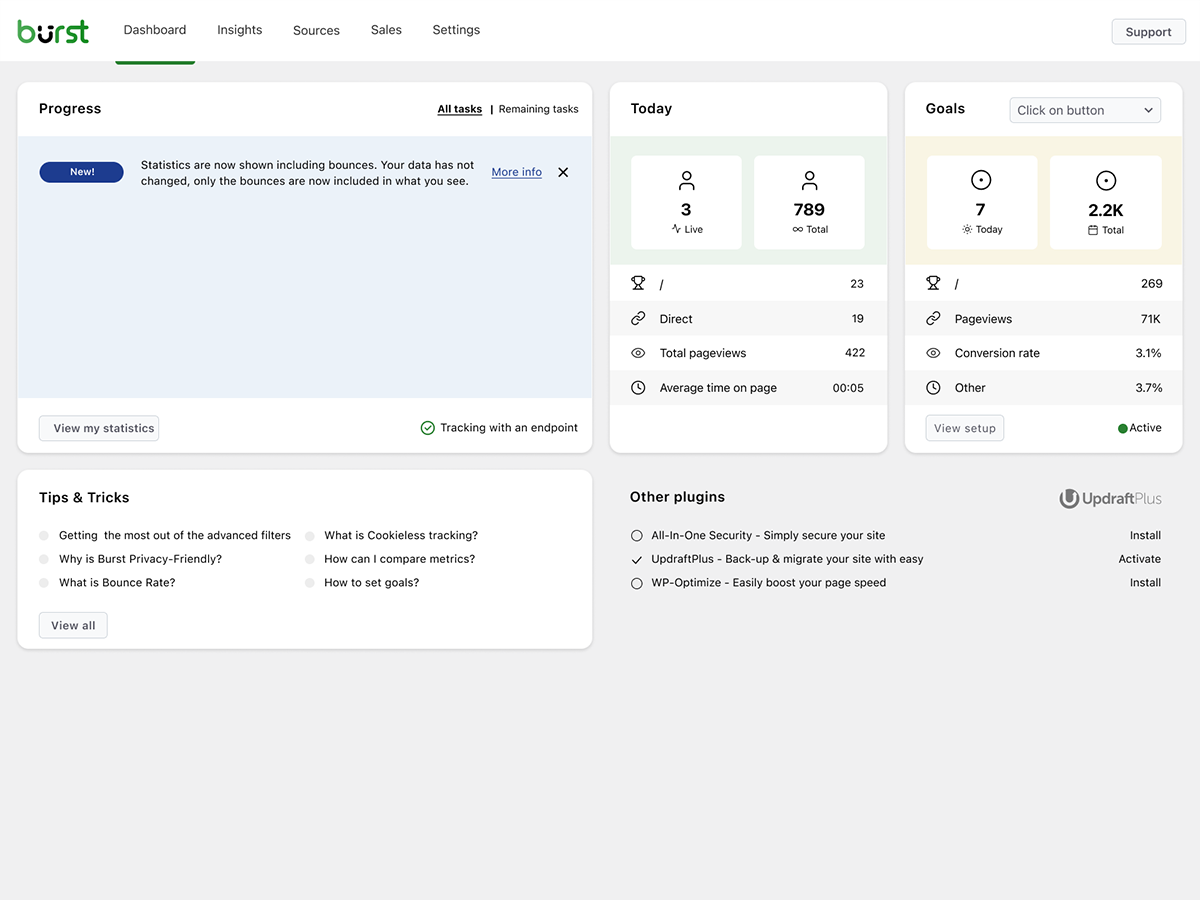
Burst Statistics 为你提供一个简洁直观的统计分析仪表盘,专注于真正重要的指标。无需外部统计账号,无需复杂设置。安装、激活,几秒内即可了解你的网站流量。
深受 200,000+ 个 WordPress 网站信赖。由 Team Updraft 团队打造,他们还开发了 UpdraftPlus、WP-Optimize 和 All-In-One Security (AIOS)。
用户怎么说
“终于有一款分析插件,我可以真正向客户讲清楚了。”
—— wordpress.org 上的 @anguskeystone“我试过 WP Statistics 和 Independent Analytics,但它们功能太多又让人摸不着头脑。Burst 的界面很直观,专注于我真正关心的东西。”
—— wordpress.org 上的 @vallered
为什么选择 Burst Statistics?
专为实际行动而设计的统计分析
其他统计插件会把所有数据都堆给你,而 Burst 只展示真正重要的内容——访客、页面浏览量、来源、热门页面——呈现在一个你真正会用的仪表盘上。没有数据过载,没有令人困惑的菜单。了解为什么 Burst 非常适合博主。
隐私优先的统计分析设计
所有网站数据都保存在你的服务器上,让 Burst 成为真正的本地统计分析解决方案。没有外部追踪。你的数据属于你,未经你的明确许可,我们永远看不到它。开箱即用,符合 GDPR 合规要求。阅读为什么 Burst Statistics 注重隐私保护。
零配置门槛
安装、激活,搞定。无需 Google Analytics 账号,无需 GA4 设置,无需追踪代码,无需繁琐配置。立即开始查看实时访客数据。刚接触统计分析?从我们的 WordPress 统计分析指南开始吧。
WordPress 原生统计分析
不是从其他平台移植过来的,而是专为 WordPress 打造,具备原生性能和无缝集成。兼容 WooCommerce、博客、企业网站和会员网站。
轻量统计分析,默认快速
优化的数据库查询。不到 4 KB 的极小追踪脚本。没有外部依赖拖慢你的页面。即使在使用激进的服务器端缓存时也能准确追踪。请参阅 Burst 会拖慢我的网站吗查看实测数据。
功能
了解你的网站流量
- 一目了然地查看表现最佳的页面和文章
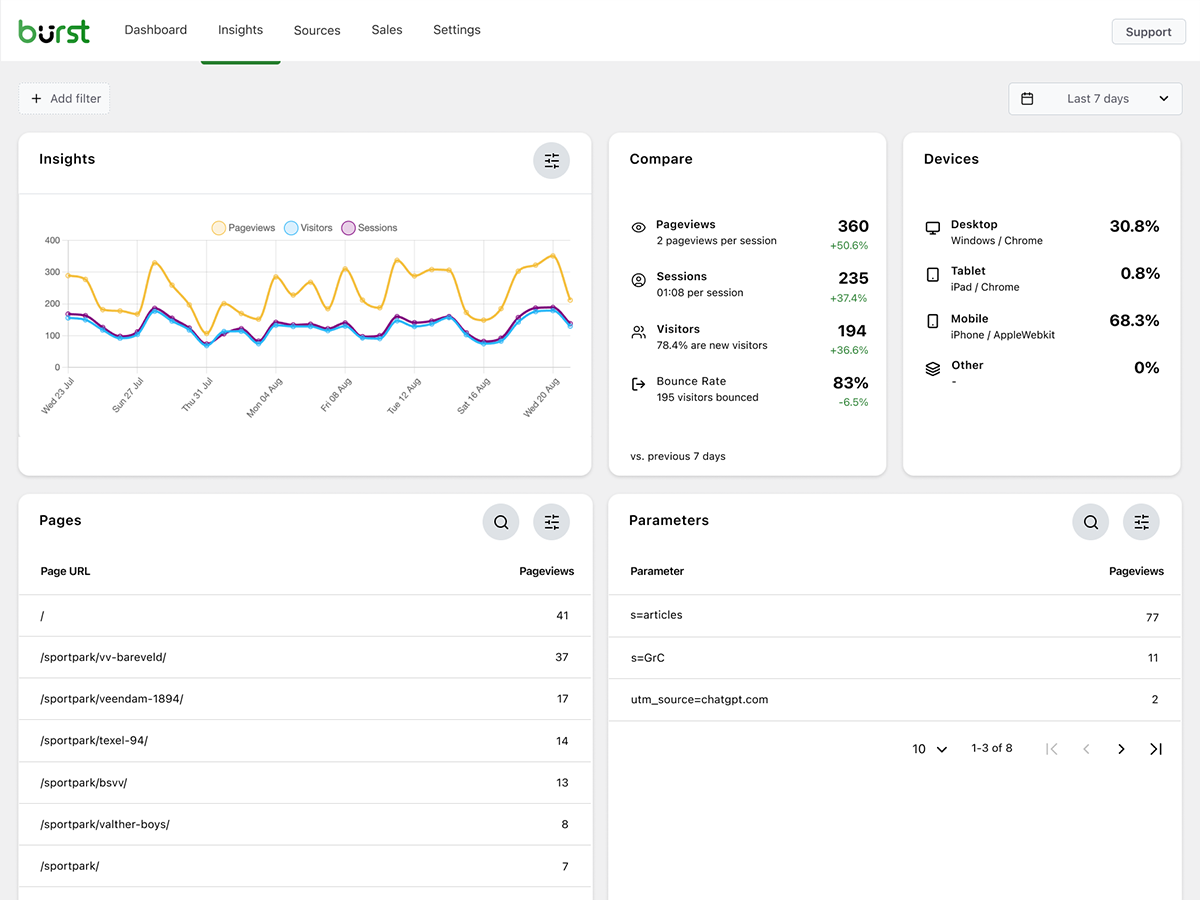
- 追踪关键指标:访客数、会话数、页面浏览量、跳出率
- 按设备类型(桌面、平板、手机)细分访客
- 按自定义日期范围筛选数据
- 对比不同时间段的流量
- Search Console 集成,直接在仪表盘上查看 Google 搜索数据
实时分析
- 识别实时访客的来源
- 查看用户当前正在访问的具体页面
- 实时显示网站当前活跃用户数
看看哪些内容表现出色
- 按浏览量排名的热门页面和文章
- 比较任意日期范围
- 追踪单个页面的表现
自定义转化与目标追踪
- 追踪浏览量、点击量和 WordPress 钩子
- 追踪 WooCommerce 分析数据与销售额(Burst Pro 商业版)
- 追踪自定义事件和转化
- 按照我们的目标设置指南一步步完成配置
毫不妥协的隐私友好型统计分析
- 100% 自托管,所有统计数据本地存储在你的 WordPress 数据库中
- 无 Cookie 追踪选项,无需使用 Cookie 的统计方案,在许多国家无需显示同意横幅
- 分析设计支持 GDPR、CCPA、DSGVO、AVG、RGPD 和 PECR 合规
- 不与 Google、Facebook 或任何第三方共享数据
保持消息灵通
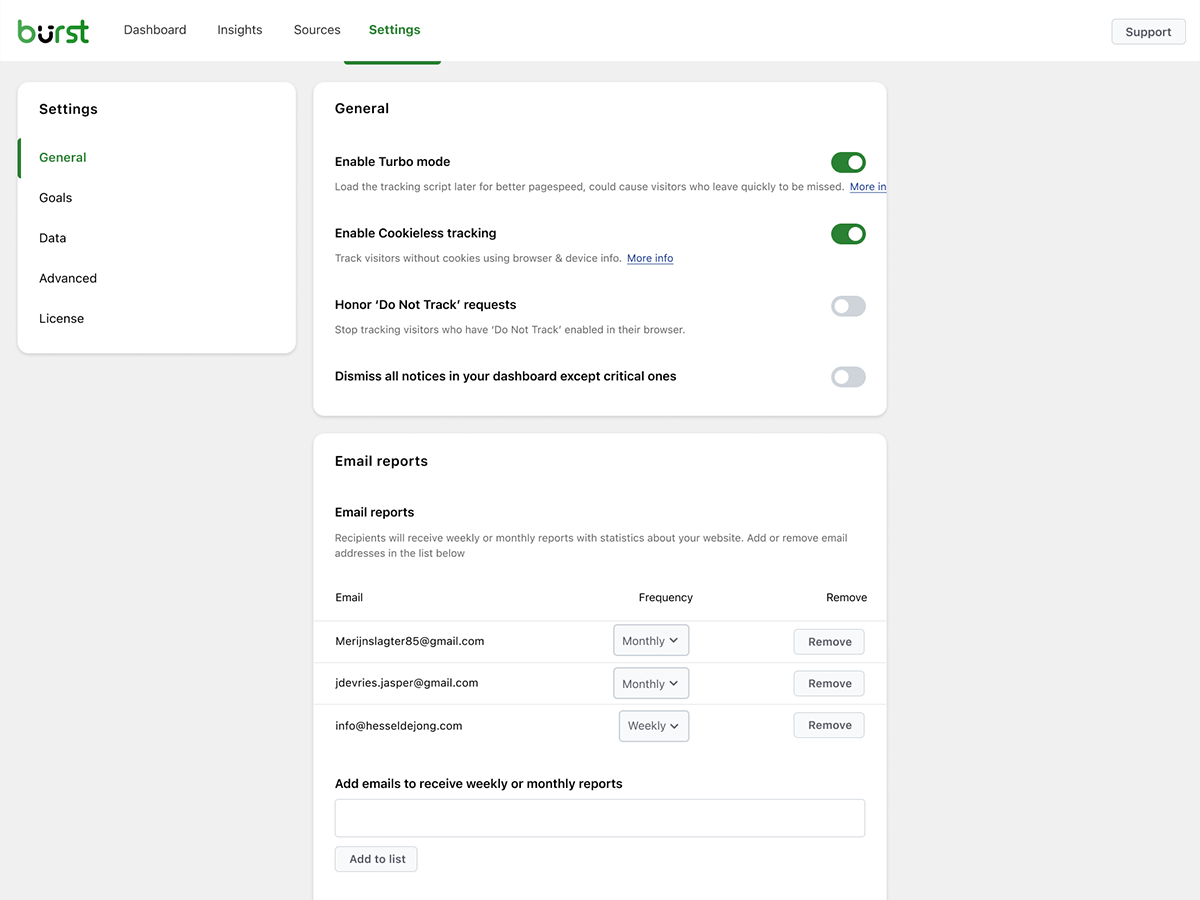
- 每周或每月的电子邮件报告直接发送到您的收件箱
- 比较不同时间段以发现趋势
- 当追踪不起作用时收到通知
WordPress 原生的 Google Analytics 替代方案
如果你已经对 Google Analytics 感到厌倦,或者从一开始就不想用 GA4,Burst 正是为你而生。作为 Google Analytics 替代方案,Burst 以清晰简洁取代了 GA4 的复杂性。你可以在单一仪表盘上获取真正重要的指标,无需数据采样,无需数据阈值限制,也无需将访客数据发送到 Google 的广告网络。
GA4 是为了让 Google 的广告业务更好而打造的,而 Burst 是为了让你的网站更好而打造的。
想了解完整情况?阅读为什么 WordPress 网站所有者正在告别 Google Analytics,或查看 Burst Statistics 与 Google Analytics 的正面对比。
来自 UpdraftPlus、WP-Optimize 和 All-In-One Security 背后的团队
Burst Statistics 是 Team Updraft 旗下的产品,该团队打造了多款市场上安装量最高的 WordPress 插件:
Burst Statistics 适合哪些人使用?
Burst 适用于任何 WordPress 网站,但我们为以下四类最能从中受益的用户提供了专属解决方案:
- 博主和内容创作者,了解哪些文章最能引起受众共鸣
- 创业者和小企业主,轻松了解你的流量和营销活动,无需复杂操作
- WooCommerce 商店,追踪访客行为、收入和产品表现
- 代理商和自由职业者,为多个客户网站管理统计分析和报告
- 注重隐私的网站所有者,无需同意横幅即可实现符合 GDPR 的分析
- 厌倦了 Google Analytics 的用户,告别困惑,获得清晰的数据洞察
免费版 vs 专业版
Burst Statistics(免费版)包含了解网站流量所需的一切功能:访客、页面浏览量、来源网站、热门内容、设备统计、目标追踪、邮件报告等。
Burst Pro 为企业和专业人士提供高级功能。在定价页面对比所有计划。
创作者计划
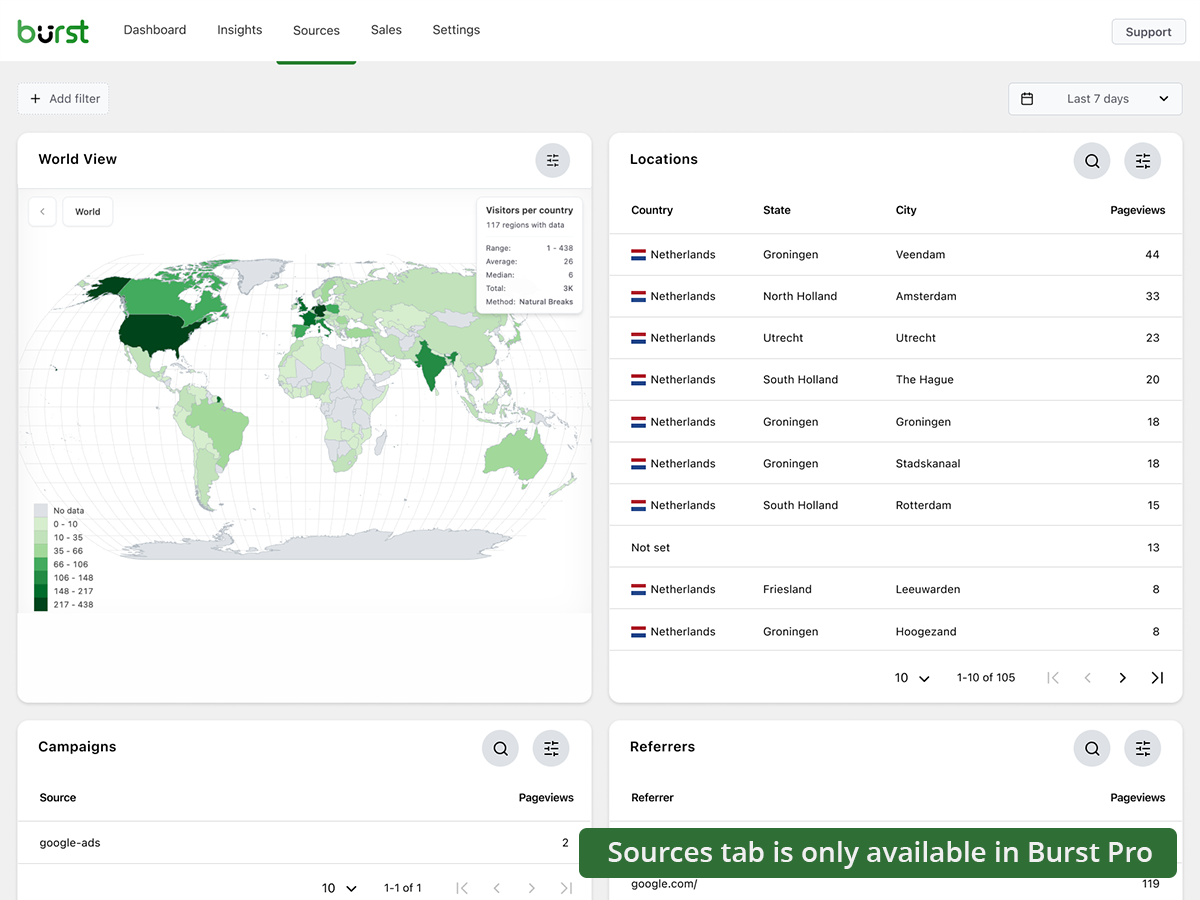
- UTM 营销活动追踪,了解哪些营销努力带来了实际效果
- 地理数据,国家和城市级别的访客洞察
- 高级筛选,按任意维度对数据进行细分
- 数据归档设置,自动保持数据库精简
- 优先支持,直接与我们的开发人员联系
商业计划
- 包含创作者计划的所有功能,以及
- 完整的 WooCommerce 销售仪表盘,查看哪些内容带来了最多收入
- 收入归因,将 WooCommerce 销售与流量来源关联起来
代理商计划
- 包含商业计划的所有功能,以及
- 报告功能,为客户生成可分享的效果报告
所有 Burst Pro 套餐均包含优先支持。你可以直接联系我们的开发人员,都是真人,不是聊天机器人。
Burst 与其他 WordPress 分析插件的对比
我们经常被问到 Burst 与其他工具相比如何。简短而诚实的回答:
- Google Analytics / GA4,GA4 功能强大,但是为广告主而非网站所有者打造的。它很复杂,会对你的数据进行采样和阈值处理,而且在大多数国家需要 Cookie 横幅。Burst 是更简单、注重隐私的 GA4 替代方案,无需繁琐设置即可显示真实数据。阅读完整对比。
- MonsterInsights,MonsterInsights 是一个将你的数据传输到 Google Analytics 的连接器。如果你想要一个真正的 MonsterInsights 替代方案,将数据保留在自己的网站上而不是发送给 Google,Burst 是更好的选择。
- Independent Analytics,一个值得尊重的竞争对手,同样秉持隐私优先、WordPress 原生的理念。Burst 在可操作仪表盘、更深入的 UTM 和目标追踪、WooCommerce 收入分析以及代理商级别报告方面更胜一筹。两者都可以试试,选择最适合你的那个。
- Koko Analytics,一款简洁轻量、专注基础功能的选择。Burst 则更进一步,提供目标追踪、实时统计、UTM 营销活动、WooCommerce 分析和邮件报告。
- WP Statistics,一款历史悠久的 WordPress 统计插件,选项繁多。许多用户觉得界面杂乱。Burst 专注于单一清晰的仪表盘,以清晰度而非功能数量为设计目标。
- Matomo,可自托管且功能丰富,但运行起来更重、更复杂。Burst 是更简单、更快速、完全 WordPress 原生的选择。
实用指南与资源
了解各项指标,解决常见问题,充分发挥统计分析的价值。全部免费,尽在 burst-statistics.com。
快速入门
隐私与 GDPR
指标与数据解读
营销活动与转化
WooCommerce
浏览完整的 学习中心了解更多内容。
安装
- 在你的 WordPress 仪表盘中前往 插件 安装插件
- 搜索 Burst
- 点击立即安装,然后激活
- 前往 统计 仪表盘 查看你的分析数据
就这些。无需注册外部账号,无需粘贴追踪代码。Burst 会立即开始收集网站统计数据。
更喜欢手动安装或通过 Composer 安装?请参阅使用 Composer 安装 Burst Statistics。
外部服务
Burst 完全在你自己的服务器上运行,不会把你的数据发送到任何地方。下面两个可选功能是仅有的会联系外部服务的功能,而且使用 Burst 时都不是必需的。有关我们的隐私政策,请查看我们的隐私声明;下面每个功能都链接到各自更具体的政策。
Google Search Console 集成(可选)
当你在集成设置页面连接你的 Google 账号后,Burst 会从 Google Search Console API(googleapis.com)获取你的搜索性能数据(查询词、点击量、展示量和排名位置),并显示在你的仪表盘中。这是单向的数据流:你的网站从 Google 获取数据,不会有任何访客或统计数据被发送到 Google 或我们这里。只有 OAuth 握手和令牌刷新会经过我们位于 search-console.burst-statistics.com 的中转服务;获取到的搜索数据会直接从 Google 传输到你自己的网站。在你连接账号之前不会发生任何事情,而且你可以随时断开连接,断开后 Google 端的令牌也会被撤销。请阅读我们的 Search Console 集成隐私政策,并查看 Google 隐私政策和 Google API 服务用户数据政策。
匿名数据共享(可选)
这是 Burst 唯一会向我们发送数据的情况,而且必须由你主动开启。当你选择启用后,Burst 会定期向 api.burst-statistics.com 发送匿名的、汇总后的使用和性能统计数据(不含访客数据,也不含个人数据)。作为回报,你的仪表盘中会显示社区性能基准,将你的网站与匿名的社区平均值进行对比,同时也帮助我们改进这个插件。请阅读我们如何处理匿名使用数据。
鸣谢
国家级别的地理数据由 MaxMind GeoLite2 数据库提供。本产品包含由 MaxMind 创建的 GeoLite2 数据,可从 https://www.maxmind.com/ 获取。
源代码
插件会将编译好的分析仪表盘放在 includes/Admin/App/build/ 中。人类可读的 React/TypeScript 源代码(includes/Admin/App/src/)和构建工具已发布在 GitHub 上。欢迎在那里提交 issue 和 pull request。
Screenshots
Blocks
This plugin provides 2 blocks.
- 页面浏览计数器
- Green hosting badge
FAQ
Burst Statistics 真的是免费的吗?
是的。Burst Statistics 100% 免费,没有追踪限制。Burst Pro 是可选的,适合需要 UTM 追踪、收入归因、地理数据或客户报告等高级功能的用户。这也是我们能为大多数用户保持 Burst Statistics 免费的方式。
数据存储在哪里?
所有统计数据都存储在你自己的 WordPress 数据库中。与 Google Analytics 或基于云的工具不同,我们完全无法访问你的数据。你的数据永远不会离开你的服务器,除非你主动选择与我们分享匿名使用数据。了解更多关于 Burst 如何处理你的数据的内容。
Burst 是一个不错的 Google Analytics 替代品吗?
是的。如果你觉得 GA4 太复杂,或者担心将访客数据发送给 Google,Burst 是一个简洁的替代选择。你可以获得真正需要的网站流量统计数据——访客、来源、热门页面、转化——而不会感到不知所措。请阅读我们的 Google Analytics 替代方案指南查看完整对比。
Burst 是 GA4 的好替代方案吗?
是的。Burst 专为希望以简洁取代复杂的网站所有者打造,是一款注重隐私的 GA4 替代方案。无需 Google 账号,无需标签管理器,大多数情况下也不需要 Cookie 横幅。请参阅为什么 WordPress 网站所有者正在告别 Google Analytics。
Burst 是 MonsterInsights 的替代方案吗?
是的。MonsterInsights 将你的 WordPress 网站连接到 Google Analytics,数据仍然流向 Google。而 Burst 将所有内容保存在你自己的服务器上,并在 WordPress 内提供专属仪表盘。如果你想要不依赖 Google 的统计分析,Burst 是更简单的 MonsterInsights 替代方案。
Burst 与 WP Statistics、Independent Analytics 或 Koko Analytics 有什么不同?
Burst 注重清晰度而非功能数量。其他一些 WordPress 统计插件界面可能显得杂乱,而 Burst 的仪表盘设计只展示真正重要的内容,去除多余的干扰。Independent Analytics 在理念上最为接近,同样秉持隐私优先、WordPress 原生的方式。Burst 的优势在于更深入的 UTM 追踪、WooCommerce 分析和代理商级别的报告功能。WP Statistics 功能更全面,但许多用户觉得它过于复杂。Koko Analytics 则刻意保持极简,适合非常基础的需求。
Burst 与 Matomo 有什么不同?
Matomo 致力于成为 Google Analytics 的完整替代品,而 Burst 则专注于成为最清晰、最实用的 WordPress 统计分析工具。如果你追求简洁、快速上手和原生 WordPress 体验,Burst 更适合你。如果你需要精细化配置和完整的 GA 风格功能集,Matomo 可能更符合你的需求。
我需要一个账户吗?
不需要,你不用注册账号,也不会有数据被发送到其他网站。如果你连接了 Google Search Console,Burst 只会从 Google 获取你的搜索数据;不会向外发送任何有关访客的信息。唯一的例外是匿名数据共享,这是一个需要你主动开启的选项,它会与我们共享匿名统计数据,作为回报,你能获得社区性能基准对比。
我可以跟踪的访客数量有限制吗?
没有。唯一的限制因素是你自己的数据库和服务器。
如果你有需要,可以选择使用无 Cookie 追踪。默认情况下,Burst 使用 Cookie,因为它更准确且更轻量。即使使用了 Cookie,Burst 依然注重隐私保护,因为所有数据都是匿名的,并存储在你自己的服务器上。了解更多关于 Cookie 为何常被误解的内容。
Burst Statistics 可以在不设置 Cookie 或不在浏览器中存储数据的情况下使用。这可能会略微影响准确性,因此也支持在获得同意后使用 Cookie 的混合方案。请参阅 Burst 如何在不使用 Cookie 的情况下追踪访客。
Burst 符合 GDPR 要求吗?
Burst 旨在支持 GDPR、CCPA、DSGVO、AVG、RGPD 和 PECR 合规要求。数据保存在你自己的服务器上,追踪是匿名的,你还可以完全禁用 Cookie。对于大多数配置,分析统计无需同意横幅。请参阅如何在不使用 Cookie 横幅的情况下配置你的网站。
我可以同时使用 Burst 和 Google Analytics 吗?
可以。很多用户会在过渡期间同时使用两者,或者保留 GA4 的历史数据,同时用 Burst 查看日常数据。两者不会冲突。
Burst Statistics 会拖慢我的网站吗?
不会。Burst 专为性能而生,采用优化的数据库查询、极简追踪脚本,以及在速度优先于精确度时可启用的 Turbo 模式。详细说明请参阅 Burst Statistics 会拖慢我的网站吗。
Burst 能和 WooCommerce 一起用吗?
是的。免费版支持基本的页面浏览量追踪。如需完整的 WooCommerce 分析、收入追踪、产品表现和销售归因,你需要 Burst Pro Business。
我该如何从其他分析插件迁移过来?
安装并激活 Burst,它会立即开始追踪数据。其他插件的历史数据无法导入,但你可以在过渡期间同时运行两个插件。
可以用 Composer 安装 Burst Statistics 吗?
是的。免费版和高级版插件都可以通过 Composer 管理。请阅读 Composer 安装指南了解更多信息。
我可以对插件提供反馈吗?
我们重视您的反馈。您可以在WordPress论坛提交支持请求,我们会及时回复。
Reviews


Contributors & Developers
“Burst Statistics – 简单的 WordPress 统计分析(Google Analytics 替代方案)” is open source software. The following people have contributed to this plugin.
Contributors


“Burst Statistics – 简单的 WordPress 统计分析(Google Analytics 替代方案)” has been translated into 68 locales. Thank you to the translators for their contributions.
Translate “Burst Statistics – 简单的 WordPress 统计分析(Google Analytics 替代方案)” into your language.
Interested in development?
Browse the code, check out the SVN repository, or subscribe to the development log by RSS.
Changelog
3.7.4
- October 29th 2026
- New: a Burst panel in the post editor shows how a post performs: pageviews, visitors, bounce rate, time on page, an engagement score and where visitors come from.
- New: show the Green Web Foundation badge on your site with the Green hosting badge block or the [burst_green_hosting_badge] shortcode, once a green hosting check confirms your host runs on green energy. The badge is stored on your own site, so visitors load nothing from a third party.
- New: essentials mode loads a minimal tracking script without scroll depth, goals and CO2 measurement, for the smallest possible footprint. Turn it on under Settings > General.
- New: click a goal in the Goals block to filter the dashboard by that goal.
- New: AI assistants connected through the WordPress MCP Adapter can now find and use the Burst abilities, also over HTTP, and can look up Burst settings and dashboard pages.
- Improvement: the community comparison icon on the dashboard is shown as a pill next to the value, its tooltip names the group of similar websites you are compared with, and while the dashboard is filtered it is greyed out with an explanation, because a filtered view cannot be compared.
- Improvement: the first community comparison arrives after a month of tracking, so a new site is compared with sites of its own size instead of the smallest group.
- Improvement: the data sharing opt-in explains more clearly what you share and what you get in return.
- Improvement: Burst stores its internal admin data in a few grouped database options instead of dozens of separate ones.
- Improvement: database tables are only upgraded when their structure changed, and Burst shows a notice when a table upgrade could not be completed.
- Security: rest api optimizer hardening, props Mateusz Będziński.
- Fix: the insights chart shifted all days by one when the date range crossed a daylight saving time change: the first day showed 0 and every other day showed the numbers of the day before.
- Fix: on hosts with a read-only plugin folder the articles block on the dashboard came back empty with a PHP warning.
- Fix: some Burst abilities returned an error or rows without the page or referrer they belonged to when an AI assistant requested them.
3.7.3
- October 19th 2026
- New: custom events. Send events from your site with burst.event() or the burst_event action and see them, with their properties, in the new Events block on the Engagement page. Turn it on under Settings > Features.
- New: a Page weight block on the Engagement page shows how heavy your pages are and estimates the CO2 emission per pageview, with a carbon rating and an optional check whether your host runs on green energy.
- New: a goal wizard that guides you step by step through creating a goal, with an element picker that lets you click the button or link to track on a preview of the page.
- New: the ‘website searches’ block shows which result the SmartMatch Search plugin suggested for each search, how often it found a match and how often visitors clicked it, when SmartMatch is active.
- New: Brevo integration, form submissions can be tracked as goals.
- New: a Notifications settings page that brings alerts, email recipients and dashboard notices together, with a choice per alert which channel it uses.
- Improvement: faster tracking on busy sites: fewer database lookups per hit and no redundant session updates.
- Improvement: deleting archived statistics and cleaning up orphaned sessions now runs in batches, so it no longer times out or locks the tables on large sites.
- Improvement: the visitor counts background build resumes where it stopped, so it completes on sites where a single run hits the time limit.
- Improvement: the database uses less space: the columns kept after the 3.7.0 migration for rollback and a redundant index on the statistics table are removed.
- Improvement: searches that are template injection probes, such as {{7*7}}, are recognized as spam and no longer show up in the Website searches block.
- Improvement: the bounce rate and conversion rate filters that were marked as coming soon are removed from the filter list.
- Improvement: the goal filter now shows the whole visit in which the goal was completed, not only the page it was completed on. A goal on a thank-you page now also shows the pages visitors saw before it, and a goal filter combined with a filter on the landing page, such as a UTM parameter, no longer shows no data.
- Fix: the query time limit was ignored on MariaDB and for some queries on MySQL, so a slow statistics query could keep running for minutes.
- Fix: on hosts that limit the length of database queries, such as WP Engine, visitor counts filtered by device, browser or operating system left out the visitors of busy days.
- Fix: excluding a goal or URL parameter in the filters counted hits more than once, which inflated pageviews, or showed no data at all.
- Fix: the per-page view showed 0 pageviews for a page after its slug had changed, while the Pages table did count them.
- Fix: on hosts that limit the length of database queries, such as WP Engine, the Pages table showed empty urls for archive and pagination pages on sites with many of them.
- Fix: the fix button on the task about anomalous visits from one visitor removed nothing. It now removes all hits of that visitor, also those from before the last day, in batches.
- Fix: a fatal error on admin pages and in application password logins when another plugin checked a capability without a name, such as a menu page registered without a capability.
- Fix: Site Health reported a plugin auto-update issue caused by the Burst update window.
- Fix: clicking Continue twice in onboarding submitted the same step twice.
- Fix: predefined goals showed an undefined title in the MainWP dashboard.
For the full changelog, see burst-statistics.com/docs/changelog.